
When you ask Spotify for a playlist and it seems to “get” your mood, you’re seeing a tiny preview of where interactive software is heading. Over the next decade, your tools won’t just wait for commands; they’ll anticipate, respond across voice, gesture, and space, and travel with you from phone to car to workspace. You’ll also face new questions about control, privacy, and collaboration with AI that you may not be ready for yet.
Interactive Software in 2035: What to Expect
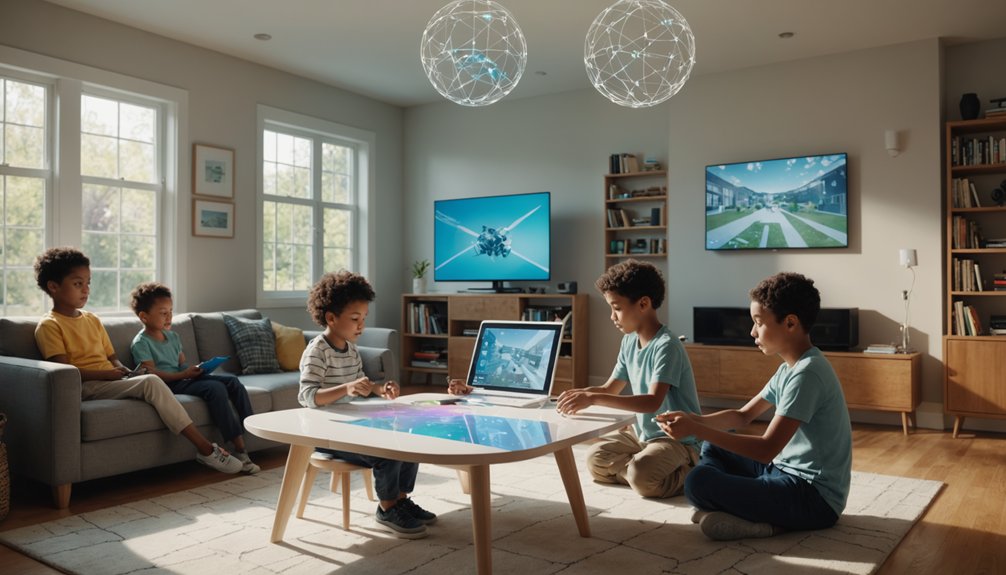
Although 2035 might seem distant, interactive software by then will feel less like a tool you operate and more like a collaborator that anticipates what you need. You’ll open an app and it’ll already know why you’re there, which is convenient and only mildly terrifying.
Your calendar won’t just track events; it’ll spin predictive narratives about your week: “If you accept this 8 a.m. meeting, coffee consumption will rise 37% and happiness will plummet.” You’ll get charts for that.
Ambient assistants will lurk in the background—on your wall, in your car, maybe in your toaster—quietly smoothing over tasks. You’ll talk to “your software” less and interact with your environment more, while everything silently syncs, sorts, and occasionally saves you from yourself.
AI-Powered Interactive Software That Feels Collaborative
Instead of feeling like you’re issuing commands into a void, AI-powered interactive software will start to behave like a perceptive teammate that catches context, offers suggestions, and adapts to your working style in real time. You won’t just click buttons; you’ll negotiate, debate, and occasionally tell it to stop “helpfully” renaming your files. To understand where interactive software came from, read our deep-dive on the history and future of MS Interactive Service.
You won’t push buttons; you’ll collaborate with software that argues back, learns you, and occasionally oversteps
These systems act as co creative agents, turning solo work into shared authorship. Your tools will:
- Analyze your habits, then pre-build drafts, mockups, or test cases while you’re still forming the idea.
- Challenge your choices with data-backed “are you sure?” prompts that feel like code review, not scolding.
- Remember team norms and personalities, translating your half-baked notes into clear tasks, minus the drama.
Beyond Screens: Spatial, AR, and Mixed Reality
Just as software is learning to behave like a collaborator, it’s also about to spill out of flat screens and into the physical spaces you move through. You won’t just open apps; you’ll walk through them. Your living room becomes a dashboard, your desk a 3D workspace, your ceiling the world’s most overqualified notification bar.
Headsets and glasses will use room mapping to pin interfaces to your walls, couch, and coffee table so they stay put as you move. Spatial audio will make alerts feel like they’re coming from the object that needs attention—your “calendar” might literally nag you from behind the fridge. You’ll rearrange digital objects like furniture, except these can’t stub your toe.
From Clicks to Multimodal: Voice, Gesture, Emotion
You’re moving from clicking buttons to speaking, gesturing, and expressing emotion as core parts of how you interact with software. Natural voice interfaces let you talk to systems in your own words, while gesture-driven interactions turn your hands and body into intuitive controls. As emotion-aware experiences emerge, your tone, facial expressions, and physiological signals can shape how software responds in real time. Presentation technology is one of the fastest-moving segments — our top interactive presentation tools for remote work showcases today’s leaders.
Natural Voice Interfaces
Step into an app and start talking, and the interface increasingly talks back, listens, watches, and responds to how you feel. You’re not “using software” anymore; you’re arguing with it like a roommate that actually remembers where you left your keys.
Natural voice interfaces turn apps into ambient assistants that hover politely in the background—until you say, “Okay, your turn.” They rely on conversational persistence, so your tools remember context instead of treating every command like a first date.
- You’ll speak in messy half-sentences, and the system will still get it.
- Your apps will share context, so your calendar knows what you told your to‑do list.
- You’ll correct them out loud—“No, that’s not what I meant”—and they’ll adapt.
Gesture-Driven Interactions
Even before you say a word, your devices are starting to read how you move, where you look, and what your hands are doing—and they’ll treat those signals as first-class input. You’ll swipe through apps with mid air control, like a conductor bossing around an orchestra of very obedient icons.
Instead of memorizing rigid motions, you’ll lean on gesture personalization. Want “close window” to be a dramatic air‑slash? Done. Prefer a tiny finger wiggle to mute calls during meetings? Also done—no judging. Next-generation IDEs are part of this story too; our best IDEs for beginner developers includes AI-assisted editors already in use today.
You’ll mix taps, voice, and gestures seamlessly: flick to scroll, pinch to zoom, point to select, all without touching glass. The challenge won’t be learning software; it’ll be remembering not to accidentally “delete all” while swatting a fly.
Emotion-Aware Experiences
You’ll see:
- Affective avatars that mirror your tone—smiling when you’re upbeat, going “supportive therapist” when your voice cracks while saying, “I’m fine.”
- Mood aware notifications that delay non‑urgent pings when you sound stressed, but surface inspiration when you’re relaxed and bored.
- Emotion-tuned interfaces that adapt difficulty, color, and pacing—your app literally becomes less annoying when you’re already annoyed.
Of course, settings will let you dial the psychic vibes way down.
Interactive Software That Follows You Across Devices
Drifting from your laptop to your phone to your TV, you increasingly expect your software to move with you, not restart every time you switch screens. In the next decade, apps won’t just sync; they’ll stalk you lovingly. You’ll pause a game on your tablet, then resume on a smart fridge like nothing happened. That’s cross device persistence: your activity, state, and progress glued together across hardware. AI note-taking is a prime example of interactive software evolving in real time — see our review of the best AI note-taking apps for students.
Behind it, seamless identity means apps always know it’s you—without fifteen logins, six codes, and a blood sample. Your playlists, layouts, and open documents trail you like digital glitter. Meetings will hop from earbuds to car dashboard mid-sentence. You won’t “open” apps; you’ll just continue experiences, wherever a screen’s nearby.
Personalization vs. Privacy in Future Interactive Software
Soon, you’ll negotiate this balance using:
- Contextual consent – You’ll decide *when* and *why* data’s collected. Movie night? Yes to recommendations. Health scare at 3 a.m.? Maybe not ad fuel.
- Adaptive anonymization – Your data morphs into blurry, privacy-friendly versions unless precision is truly needed.
- On-device intelligence – More personalization happens locally, so your phone knows you intimately, but the cloud only gets vague gossip, not your full diary.
Future Interactive Software for Work and Productivity
As your data boundaries get smarter and more negotiable, the next frontier is how interactive software reshapes the workday itself. You’ll move through Hybrid Workflows where tools stop arguing about whose calendar is “right” and simply coordinate like grown-ups. Your documents, chats, and dashboards will sync in real time, whether you’re on a couch, in a cube, or hiding in a conference room.
Contextual Automation quietly handles the boring parts: drafting status updates from meeting notes, logging tasks from emails, and reminding you what matters before your brain remembers coffee. Instead of hunting for files, you’ll ask, “Show me what I need for this client,” and the system assembles it. Your main job becomes judgment, not juggling tabs. Privacy tools like VPNs will need to keep pace with emerging threats; our VPN comparison guide evaluates current options on speed and privacy.
How Future Software Will Change Play and Social Life
While work software gets smarter and more invisible, your play and social life are about to be rewritten even more dramatically. You won’t just “go online”; you’ll slip into overlapping multiplayer ecosystems where your friends, games, and hobbies share one continuous stage—and yes, it’ll still lag right when you’re about to win.
- You’ll jump from a co-op boss fight to a virtual concert with the same crew, keeping your avatar, inventory, and inside jokes intact.
- Group chats will feel like sitcom sets, with AI curating memes, highlights, and “remember when you said this?” flashbacks.
- community moderation will quietly evolve into neighborhood watch 3.0, with smart tools sorting trolls from tired humans who just need a snack.
Designing Future Interactive Software That’s Ethical and Accessible
As you imagine the next generation of interactive software, you’re responsible for making inclusive experiences the default, not an afterthought. That means designing interfaces and interactions that work for people with different abilities, contexts, and devices from the start. It also means being radically clear about how data is collected, used, and shared so people can give meaningful, informed consent.
Inclusive Experience By Design
Designing interactive software for the future means treating inclusivity, ethics, and accessibility as core requirements, not afterthoughts. You’re not just pushing pixels; you’re architecting who gets to participate, learn, work, and play. That’s where inclusive design stops being a buzzword and starts being your QA test for basic human decency.
To bake this into your product instead of duct‑taping it later, ask three ruthless questions: Interactive video content is a growth area — our best screen recording software guide covers tools that already blend recording with real-time annotation.
- Who can’t use this? Test with real people across abilities, devices, bandwidths, and cultures.
- Who’s uncomfortable using this? Design equitable onboarding that doesn’t assume perfect vision, English fluency, or tech literacy.
- Who’s punished for using this? Avoid dark patterns, shame‑driven flows, and designs that quietly sideline anyone who’s “not the default.”
Transparent Data And Consent
Even the most inclusive interface falls apart ethically if users don’t actually understand what their data’s doing behind the glass. You can’t call it “consent” if people need a decoder ring and three cups of coffee to read your privacy panel.
In the next decade, you’ll need dashboards that show what’s collected, why, for how long, and with whom it’s shared—without sounding like a legal exorcism. Think clear toggles, real‑time logs, and granular permissions that let users say, “Yes to recommendations, no to creepy tracking.”
You’ll also lean on data trusts—independent stewards that guard users’ information and enforce rules. Design as if every dialog might be screenshot and posted online, because it probably will be.
Skills to Succeed With Tomorrow’s Interactive Software
How will you thrive in a world where software doesn’t just wait for input but anticipates it, adapts to you, and collaborates in real time? You’ll need serious skill adaptability—less “I mastered this tool” and more “I surf continuous updates without face-planting.” Interdisciplinary literacy is your secret weapon: mixing basic coding, UX sense, data skepticism, and a dash of psychology so you understand both the machine and the humans it’s nudging. Browser extensions represent interactive software at its most accessible; our Chrome productivity extension roundup highlights the most innovative picks.
Thriving means surfing constant change—blending code, UX, data doubt, and psychology to steer ever-smarter systems
- Learn to prompt and question – Talk to systems clearly, but also interrogate their suggestions.
- Prototype fast – Treat every feature as a draft, not a monument.
- Co-manage with AI – Delegate repetitive work while you own goals, ethics, and creative direction.
Frequently Asked Questions
How Will Future Interactive Software Impact Mental Health and Digital Well-Being?
It’ll both rescue and roast your brain: Emotional Analytics will track your mood swings like a drama series, while Attention Design will battle doom‑scrolling, nudging you toward healthier habits—like closing the app and touching grass.
What New Jobs and Careers Will Emerge Around Interactive Software Ecosystems?
You’ll see new gigs: AI ethicist, Experience curator, emotion-debugger, avatar stylist, attention coach, and narrative architect—careers where you’re paid to push buttons, ask “should we?”, and make software less soul-sucking, more belly-laugh-inducing.
How Will Interactive Software Reshape Education and Lifelong Learning Outside Formal Schools?
You’ll learn through adaptive tutors that stalk your weaknesses (nicely) and reward procrastination less. Contextual simulations’ll drop you into fake crises—negotiations, surgeries, dragon raids—so every boring tutorial becomes “learning by mildly terrifying experience.”
What Regulations Might Governments Introduce for Highly Immersive Interactive Experiences?
You’ll likely face strict age-gating, mandatory content warnings, standardized consent frameworks, biometric data rules, and time‑limit safeguards—basically a digital theme park where government lifeguards blow whistles every time you “immerse” a little too hard.
How Can Parents Guide Children’s Use of Advanced Interactive and Mixed-Reality Tools?
You herd digital dinosaurs: set limits on screen time, enable parental controls, lock tight privacy settings, and teach consent education. Play alongside them, ask questions, model breaks, and treat mixed-reality like candy—awesome, but not for breakfast.
Conclusion
As you step into this future, you’re less a “user” and more a conductor. Picture a jazz band: your AI teammate anticipates the next note, your devices keep the rhythm, and your data stays safely in tune. By 2035, when 80% of routine tasks may be automated, your real job isn’t clicking buttons—it’s setting direction, asking better questions, and choosing which melodies of work, play, and connection you want to lead.